Saturday, October 01, 2016

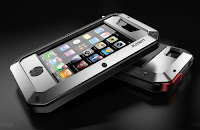
Handphone Protector

handphone is the stuff that is always attached in your pocket. This mobile is a common item, but that does not mean it is not worthwhile because some of them have a high price.
Because some of us have to save first and then buy them then here are some tips to protect your beloved phone from damage:


  1. Use Waterproof Smartphone Case.
    In some circumstances these items can save your phone from water.
  2. Phone Gel Pad.

    This Gel PAd help to paste your phone anywhere. Stick it everywhere.
Other tips please add yourself. :)

Monday, April 29, 2013

Jailbreak 6 Untethered Evasi0n

for those users Apple devices that using iOS 6 operating system is now smiling because the latest version of jailbreak is to be applied on the device. This year team Evad3rs has issued apps to jailbreak using latest Evasi0n version.


Devices that support this tool:
  • iPhone 5
  • iPhone 4S
  • iPhone 4
  • iPhone 3GS
  • iPad 4
  • iPad 3
  • iPad 2
  • iPad mini
  • iPod touch 4
  • iPod touch 5 
Firmware version that support:
  • iOS 6.0
  • iOS 6.0.1
  • iOS 6.0.2
  • iOS 6.1 
You can download the Evasi0n here

Download Evasi0n for windows

 Download Evasi0n for Mac

Download Evasi0n for Linux

Update 1: This is readme file inside Evasi0n, i think this is also a tutorial too ;D
~~~~~~~~~~~~~~~~~~~~~~~~~~~~~
evasi0n 1.1 (c) 2013 @evad3rs
~~~~~~~~~~~~~~~~~~~~~~~~~~~~~

http://evasi0n.com/


DESCRIPTION:

- evasi0n 1.1 is an untethered jailbreak for all iPhone, iPod touch, iPad and iPad mini models running iOS 6.0 through 6.1


SYSTEM REQUIREMENTS:

- MacOSX 10.5/10.6/10.7/10.8
- Windows (XP minimum)
- Linux x86/x86_64 (Kernel >= 2.6.24, libgtk+-2.0 >= 2.24.13)


SUPPORTED FIRMWARES:

- iOS 6.0, 6.0.1, 6.0.2, and 6.1


INSTRUCTIONS:

- Backup your device using iTunes (or iCloud) before using evasi0n. If something breaks, you'll always be able to recover your data.
- Those who use backup passwords in iTunes must disable them for now.  After doing so, iTunes makes a brand new backup.  Please wait for that backup to complete before proceeding!  Feel free to re-enable your backup password after jailbreaking.
- Please disable the lock passcode of your iOS device before using evasi0n. It can cause issues.
- Launch evasi0n, plug in your device, and click "Jailbreak". Just sit back and observe its progress.  Watch for any steps you may be asked to perform.
- Avoid all iOS and iTunes related tasks until evasi0n is complete. Why not just enjoy a brief break from the computer to stretch your legs?
- If the process gets stuck somewhere, it's safe to restart the program, reboot the device (if necessary by holding down Power and Home until it shuts down), and rerun the process.


FAQ:

If you have any questions regarding the jailbreak process or jailbreaking in general
please go to the Jailbreak QA dedicated website: http://www.jailbreakqa.com
or see their help page for evasi0n: http://www.jailbreakqa.com/pages/evasi0n-help
or try /r/jailbreak on Reddit: http://reddit.com/r/jailbreak


CREDITS:

evasi0n is a production of @evad3rs. http://evad3rs.com


THANKS TO:

- @phoenixdev for his research
- @Surenix for evad3rs and evasi0n designs
- Hanene Samara for her work on evasi0n GUI
- @chronicdevteam and @iphone_dev for their support
- Kiki the cat for the inspiration


Thursday, April 11, 2013

Table Colors Match

Playing colors in your template and make it more beautiful. Here is a sample colors lab that picked from many source and inspiration by many site.
Try to use this colors between border and body.


  1. Blogger Loading Colors (Yellow) Border : F0C36D
    Body : F9EDBE
    Image result :


  2. This template header (Soft Blue)
    Border : 9DACCE
    Body : EFF3FF
    Result :


  3. another colors update soon . .

New Cool Blogger Template


This is the new blogger for you. I hope you like this. I don't remember where i got this template. I redesigned this template a little bit. And yes i use this template for now. (14-3-2013)

What you can found here is:
  • Read more 
  • multi column
  • magazine style
  • custom header
  • easy share via social media
  • adsense ready
  • etc
If you know the original author of this template please tell me, and i will happy to put the credits below. Thank you.


You can get the template here for free.
Download here (80 Kb)

Monday, April 08, 2013

Article Request

Now you can request article/post here. Yes here!

Advantages:
  • You get link from high PR blog
  • one way link from this blog
  • SERP
  • Free, do not need to pay. 100% free
How to request my post here?
  1. Write your own article, min 200 words.
  2. Your article must be an original content (we seriously check your article first)
  3. Send your article to evo.amasia@gmail.com
  4. Max link on your post is 3
  5. write you category below your article.
  6. If you have a template, don't forget to add http://templates-gallery.blogspot.com at the footer.
 
Ok, what you waiting for, ;D 

Friday, March 22, 2013

How to survive with your blog

Keep your blog with original content. Do not copy others and put it in to your site. It just wasting your time. But it's true you could have a tons of article when you do that. Just write whatever you want and post it. It's enough to keep your blog alive for a years.

Just remember google loves the original site. Write your own idea and create a creation of words and feel alive again ;D

I know you write english better than me. But i try my best to write an original content. I need about 30 minutes to write this sentences. haha.

But my advice to keep your blog alive is keep write an original mind. Post it.

I tell you about my 2 sites. One site use an original content and the other just copying from another site (don't try again;p). And the different is after one years the original site still on the first page on google search, and the website that copying article is gone from the search engine.

That prove that a blog using an original content survive more than a copy site.
Keep post your idea ;)
Thursday, February 28, 2013

Harleem style

hahaha lol. I've just seen some funny dance on youtube. It's called harleem shake. Almost like gangnam style psy, but the different this shake has no choreography .

Now i'm thinking to make my new version of harleem shake with mars planet background haha.

Still bout SEO, this page of harleem shake written there.

Sunday, February 03, 2013

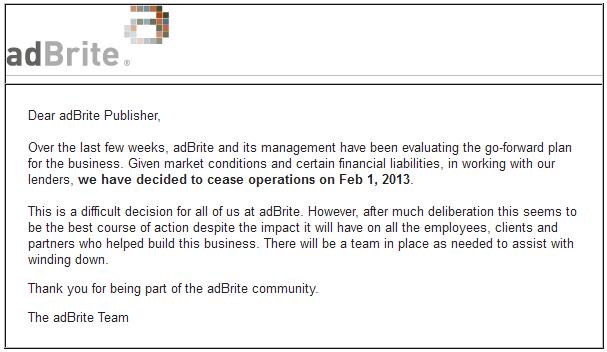
Adbrite closed service scam

This is a bad news for now.

After years using their services now adbrite decided to close services. Gosh i lose many cash there.  This message I've got from my mail. And i think all of us disappointed from now. #hammerface.

Let see our mailbox, find of you got this message too.


After open their site, it said 404 page not found #angry

So open up your heart and let all the money goes away.

And other scam listed here is ziddu. After 2008 and first payment about $10, now ziddu delete their earning stats. Oh gosh.. another M***ER F**KER scam.

This make me sure google adsense still the trusted site for earning some cash. even tough now it's difficult to make a new account.

Others, sorry for being late to update this blog. Still looking the best idea for a new topic (trending topic) aha.

Tuesday, November 29, 2011

Delete Undeepfreeze

How to delete deepfreeze from your computer. I browse and find this software and trust me this is really works to delete deepfreeze from your computer. Download the deepfreeze uninstal here.


The story begin when i leave my computer on my desk and when i'm back i found someone had instal deepfreeze in my computer. I know that i can't save my works again and i can do nothing with my computer again.


I'm afraid if i re installing the OS i will lose all of my works. Other way, what if someone had instal a spy program in to my computer? 


Then i go to internet cafe near my house and i found this program. I hope it will help me, and the truth is yes. It works. Now the deepfreeze is gone and i start to scan my computer from spying activity. And now i can use my computer like before. 


I hope i can help someone out there who had a same case like me. 


Download here

Adsense banned

There are many adsense publishers that receive mail from google. It said that the publisher got banned from google adsense. That happen not only for one person, but a few months ago thousand publisher talks about this.

As we know google didn't explain the cause. And guest what, i'm also got banned. (sad)


Until now i don't know why this happen to me. Because i'm using adsense and use the adsense TOS as my guide. 


Many people say that the europe economic situation made this. Beside that google loose their profit because facebook also take a huge number advertiser to advertise on their site. And many reason else.


After this case, i make a decision to make another publisher account.


I choose adbrite. Maybe not as much as google adsense earn. but have some variation in publishing ads. example like an ads inside a post (almost like a link). I start using adbrite and it's not bad. :)


Try adbrite now, and don't put your egg at one basket. So if you broke one, you still have another one. Good luck :)

Wednesday, March 30, 2011

how to make spoiler on blogspot

This is tutorial how to make spoiler in blogger. What is spoiler?
Spoiler usually use inside forum to hide some text or image. The text or image will be shown if the spoiler button is clicked.

This is the sample of spoiler button inside blog.


How to make spoiler:
Copy this script and paste it into your new post editor.

<div style="margin: 5px 20px 20px;"><div class="smallfont" style="margin-bottom: 2px;">Your Title : <input value="Show" style="margin: 0px; padding: 0px; width: 60px; font-size: 10px;" onclick="if (this.parentNode.parentNode.getElementsByTagName('div')[1].getElementsByTagName('div')[0].style.display != '') { this.parentNode.parentNode.getElementsByTagName('div')[1].getElementsByTagName('div')[0].style.display = ''; this.innerText = ''; this.value = 'Hide'; } else { this.parentNode.parentNode.getElementsByTagName('div')[1].getElementsByTagName('div')[0].style.display = 'none'; this.innerText = ''; this.value = 'Show'; }" type="button"> </div><br /><div class="alt2" style="margin: 0px; padding: 6px; border: 1px inset;background: #f1f1f1 none repeat scroll 0% 50%; -moz-background-clip: -moz-initial; -moz-background-origin: -moz-initial; -moz-background-inline-policy: -moz-initial; color: rgb(127, 69, 0); line-height: 1.5em;"><div style="display:none;">Your Text or Image Link<br /></div></div></div>


Copy below script to insert image into spoiler

<div style="margin: 5px 20px 20px;"><div class="smallfont" style="margin-bottom: 2px;">Your Title : <input value="Show" style="margin: 0px; padding: 0px; width: 60px; font-size: 10px;" onclick="if (this.parentNode.parentNode.getElementsByTagName('div')[1].getElementsByTagName('div')[0].style.display != '') { this.parentNode.parentNode.getElementsByTagName('div')[1].getElementsByTagName('div')[0].style.display = ''; this.innerText = ''; this.value = 'Hide'; } else { this.parentNode.parentNode.getElementsByTagName('div')[1].getElementsByTagName('div')[0].style.display = 'none'; this.innerText = ''; this.value = 'Show'; }" type="button"> </div>
<div class="alt2" style="margin: 0px; padding: 6px; border: 1px inset; background-color: rgb(255, 255, 255); background-image: none; background-repeat: repeat; background-attachment: scroll; background-position: 0% 50%; -moz-background-size: auto auto; -moz-background-clip: -moz-initial; -moz-background-origin: -moz-initial; -moz-background-inline-policy: -moz-initial; color: rgb(125, 125, 125); line-height: 1.5em;"><div style="display: none;">
<a onblur="try {parent.deselectBloggerImageGracefully();} catch(e) {}" href="https://blogger.googleusercontent.com/img/b/R29vZ2xl/AVvXsEizP6HYsop0gpi1Vfeej861_6sISVRkM4AKt50ZVsiAqmt9xLLroCvus5mkOLglNcCT_WbU8zYS2I2gGEB78SErPYMqOhOlDEtun3458dUQLNuQj0ejNU9SKJ4SiT6iexp6oWMccs_M2Io/s320/BLOGGER.gif"><img style="margin: 0pt 20px 20px 0pt; cursor: pointer; width: 128px; height: 128px;" src="https://blogger.googleusercontent.com/img/b/R29vZ2xl/AVvXsEizP6HYsop0gpi1Vfeej861_6sISVRkM4AKt50ZVsiAqmt9xLLroCvus5mkOLglNcCT_WbU8zYS2I2gGEB78SErPYMqOhOlDEtun3458dUQLNuQj0ejNU9SKJ4SiT6iexp6oWMccs_M2Io/s320/BLOGGER.gif" alt="spoiler" title="spoilers" border="0" /></a>

</div></div></div>


Enjoy the blog spoiler

Mosque layout style

Mosque Here is mosque template for blog spot


Here is mosque template for blogspot. 2 column, simple design, and litle dark dominant color. Modified this template your self to get another template.

Click here to download this template..

Zipped, 8.4 KB free from trojan and virus. you can download this blogger template for free.

Red orange layout

Download red orange template for blogspot


red template Red and orange blogger template is a magazine layout. 3 columns, light template, nice and lovely blog.

This red template is originaly taken from smash and magazine, i forgot the link but you can searh him more at google.

Download red template here for free.

The template zipped inside and the size is about 11.4 KB.

Don't forget to backup old template before use this one. Regards.

Phone Secret Number

This is the trick for handphone user.

Maybe you are freak about this gadget. If so, you need to know some phone tricksecret. Try this trick:

Nokia code access:

*#73# : reset timer and game reset [for type N]
*#30# : show private number who called
*#2820# : showing bluetoth IP
xx# : fast call from phone book
off button : shortcut to change profil
*3370# : activate EFR
#3370#: deactivate EFR
*#4270# : activate and deactivate Half rate codec for your phone
*#0000# : show phone version
*#9999# : alternative if *#0000# not work
*#06# : IMEI number
*#21# checking all called that used
*#2640# : showing security code that used
*#43 # : call waiting check
*#61# : no reply mode
*#21*number# : all call
*#61*number# : no reply
*#67*number# : on busy
*#67705646# change logo operator for nokia 3310 and 3330
*#746025625# : SIM lock status
*#7760# : factory code
*#92702689# show serial number and another data.
*#3283# : week production/motnh and year *nokia 21XX
*#9999# software version *nokia 21XX


Secret code for sony ericsson:

*#06# : IMEI number
*#0000# : reset language to international language
> * < < * < * : service menu - software version. press "yes" repeatly to look all content software data and press ">" to read all text inside phone.
< * * < : Lock sim card


Shortcut for ericsson:

Save missed call on phone directory.
open menu "missed call", press yes to show number. then press (0 - 9), then clear once to block the number, press and hold "<" until "store" is show, yes.

Hide Number
after pressed the number press > > before yes. it will shown hide id question.

Battery check when off
Press 'no' rapidly and look at the battery display level

Image mode
press 1 to left rotate
2 : rotate to right
5 or 7 : zoom in and zoom out
* : for fullscreen and restore

Hard reset
Warning!! all data will be erased.
when phone is off mode press 'yess' , '3' , and '*'. then when you pressed the button, press on buttin once again.

Undeepfreezee 7

What is undeepfreeze?
This is the software to help you uninstall deepfreeze from your computer.


what is deepfreeze?
Deepfreeze is a software to frozen your hardisk from anything. So when you restart your computer, the data will be deleted from previous session. There is no data can saved or deleted from your hardisk if you are using deepfreeze.

This undeepfreeze make to help you from losing pasword deepfreeze.

click here to download deepfreeze

Hold shift and double click the bear icon at your taskbar to open deepfreeze login box. Use this software to undeepfreeze your deepfreeze.

click here to download undeepfreeze

Related post on your blog

Tutorial how to make related article into your post:
  1. Login to blogger.
  2. Open >>LayOut<< ----> Edit HTML
  3. Check at 'Expand Widget Templates'
  4. find <data:post.body/> and paste script below.

  5. Script :


    <b:if cond='data:blog.pageType == "item"'>
    <H2>Another link related</H2>
    <div class='rbbox'>
    <div style='margin:0; padding:10px;height:200px;overflow:auto;border:1px solid #ccc;'>
    <div id='ardi33'/>
    <script type='text/javascript'>
    var homeUrl3 = "<data:blog.homepageUrl/>";
    var maxNumberOfPostsPerLabel = 4;
    var maxNumberOfLabels = 10;
    maxNumberOfPostsPerLabel = 100;
    maxNumberOfLabels = 3;
    function listEntries10(json) {
    var ul = document.createElement('ul');
    var maxPosts = (json.feed.entry.length <= maxNumberOfPostsPerLabel) ?
    json.feed.entry.length : maxNumberOfPostsPerLabel;
    for (var i = 0; i < maxPosts; i++) {
    var entry = json.feed.entry[i];
    var alturl;
    for (var k = 0; k < entry.link.length; k++) {
    if (entry.link[k].rel == 'alternate') {
    alturl = entry.link[k].href;
    break;
    }
    }
    var li = document.createElement('li');
    var a = document.createElement('a');
    a.href = alturl;
    if(a.href!=location.href) {
    var txt = document.createTextNode(entry.title.$t);
    a.appendChild(txt);
    li.appendChild(a);
    ul.appendChild(li);
    }
    }
    for (var l = 0; l < json.feed.link.length; l++) {
    if (json.feed.link[l].rel == 'alternate') {
    var raw = json.feed.link[l].href;
    var label = raw.substr(homeUrl3.length+13);
    var k;
    for (k=0; k<20; k++) label = label.replace("%20", " ");
    var txt = document.createTextNode(label);
    var h = document.createElement('b');
    h.appendChild(txt);
    var div1 = document.createElement('div');
    div1.appendChild(h);
    div1.appendChild(ul);
    document.getElementById('ardi33').appendChild(div1);
    }
    }
    }
    function search10(query, label) {
    var script = document.createElement('script');
    script.setAttribute('src', query + 'feeds/posts/default/-/'
    + label +
    '?alt=json-in-script&callback=listEntries10');
    script.setAttribute('type', 'text/javascript');
    document.documentElement.firstChild.appendChild(script);
    }
    var labelArray = new Array();
    var numLabel = 0;
    <b:loop values='data:posts' var='post'>
    <b:loop values='data:post.labels' var='label'>
    textLabel = "<data:label.name/>";
    var test = 0;
    for (var i = 0; i < labelArray.length; i++)
    if (labelArray[i] == textLabel) test = 1;
    if (test == 0) {
    labelArray.push(textLabel);
    var maxLabels = (labelArray.length <= maxNumberOfLabels) ?
    labelArray.length : maxNumberOfLabels;
    if (numLabel < maxLabels) {
    search10(homeUrl3, textLabel);
    numLabel++;
    }
    }
    </b:loop>
    </b:loop>
    </script>
    </div>
    <script type="text/javascript">RelPost();</script>
    </div>
    </b:if>


  6. If you are using read more widget, You will found two "<data:post.body/>". Paste the script under the first code.
  7. Save template
Notes:
Please make sure to backup your template first.

Blog Stats [Live]

This is Blog tutorial how to make blog statistic into blog. Just follow the blog guide.

  1. Login blogger
  2. Layout --> Add gadget --> HTML Script
  3. insert this script

    <script style="text/javascript">

    function numberOfPosts(json) {
    document.write('Total Posts: <b>' + json.feed.openSearch$totalResults.$t + '</b><br>');
    }

    function numberOfComments(json) {
    document.write('Total Comments: <b>' + json.feed.openSearch$totalResults.$t + '</b><br>');
    }

    </script>

    <ul><li><script src="http://YOURBLOGNAME.blogspot.com/feeds/posts/default?alt=json-in-script&callback=numberOfPosts"></script></li>

    <li><script src="http://YOURBLOGNAME.blogspot.com/feeds/comments/default?alt=json-in-script&callback=numberOfComments"></script></li></ul>
    <noscript><a href="http://YOURBLOGNAME.blogspot.com" target="_blank">Blogger Hacks</a></noscript>

That's it. ;)

Just change the YOURBLOGNAME into your blog name address.

Showcase layout

Here is WP Show case for blogspot theme
Download 9KB zipped file for WP Showcase blogger template. 2 column layour template for blogger. This WP showcase template running at mozilla and chrome.

Download template here


credits to template place

Amazong integrated

Associates integration amazon with adsense. Now you can integrate amazon with blogspot.


integrated your amazon account into blogger side bar. and the image will look like this.


have fun with your new sidebar..

Double adsense template

Imagine you can double your adsense earning by use this template.

Some people may think and work how to increase their earning in adsense. Writing original content, making template, post a new hot news, write some articles, tutorial, looking for some cash in this cyber world.

It is possible to double cash your earning. This adsense template may help you. Just try and you'll like it.

There is no escape from your ads service. Monetize through earning and get your cash double. I've try this template at here and i get some reality that happy. What is it? Adsense cash oh yeah...

Download adsense template to double your adsense earning.

View demo page here

Tell me if you like this template. Just comment here and ask for the link.
Thanks.


Notes: i'm sorry since one of my blog use this template. The penalty given by adsense. I don't recommend you to use this layout again. thanks.

Handphone Protector

handphone is the stuff that is always attached in your pocket. This m obile is a common item , but that does not mean it is not w...